
Most contractors don't lose jobs because a competitor does better work. They lose them because the competitor's website made it easier to pick up the phone.
A website for a plumbing, HVAC, roofing, electrical, or landscaping company has one job: convince a homeowner nearby, usually on their phone and often with a problem right in front of them, to call or request a quote now.
Here's what that takes, in the order it matters. None of it requires a five-figure budget. It requires doing things in the right order, which is the part most DIY builds and rushed projects skip.
1. Decide What Work You Want More Of
Before any copy gets written, pick your main service area and the handful of jobs you actually want more of.
A site trying to rank for everything tends to rank well for nothing.
A roofer who picks "roof replacement" and "storm damage repair" as the two priorities has a much better shot than a page trying to cover twenty services, and an HVAC company that wants more system replacements than tune-ups should build the site around replacements.
Then write down what actually sets you apart, in plain words: same-day service, licensed and insured, a manufacturer certification like GAF or Carrier, financing, or a workmanship guarantee. Each of those becomes a headline, a page section, or a line in your Google Business Profile later, so settling them now saves rewriting the site after it's built.
2. Plan Every Page Before Anyone Designs Anything
List the pages first: home, one page per core service, one page per town you really want work in, about, reviews or past projects, and contact. Decide what you want a visitor to do on each one, whether that's call, request a quote, or book online, so the design has a job to do instead of just looking nice.
A one-page sketch is enough, even on the back of an estimate sheet. It settles what's needed before anyone starts debating fonts and colors, which is where most website projects lose weeks.
3. Choose A Platform You Can Actually Update
For most trades businesses, WordPress with a modern page builder is the practical choice. It's flexible, you own it instead of renting it from a website-builder subscription, and if you ever switch companies, your site goes with you.
Here's how the common options actually compare for a local business:
• Website builders (Wix, Squarespace): fast to launch, but you're renting the platform, and migrating later usually means starting over.
• WordPress with a modern builder: the most flexible option, fully owned, and the easiest to hand off if you ever change agencies.
• A custom-coded site: the most control, but usually the most expensive to maintain and the slowest to update yourself.
4. Show Proof Before You Ask For The Call
Real photos of your own trucks, crew, and finished jobs, real reviews, and a phone number at the top of every page do more than any design trick. Stock photos of smiling models in hard hats do the opposite. Speed matters too: a site that takes six seconds to load on a phone loses the homeowner standing in a flooded basement before they ever see your number.
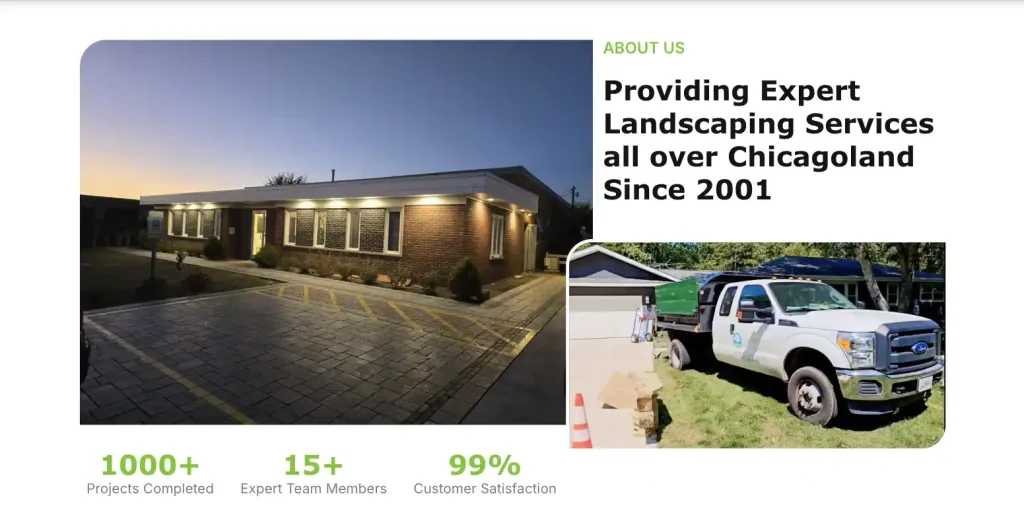
A landscaping company's About section: their own truck and office, with trust callouts right beside them.
Beyond photos and reviews, a handful of small additions do outsized work:
✓ A visible phone number in the header on every page, not just Contact
✓ License numbers, insurance, and manufacturer or trade association logos where they apply
✓ Specific numbers: years in business, jobs completed, how fast you usually respond
✓ A clear list or map of the towns you serve, even if you don't have a storefront
5. Build In SEO From Day One
Local SEO isn't something to bolt on later. Page titles, a claimed and complete Google Business Profile, and a dedicated page for each service and each main town you serve should be part of the first build.
This also means giving each major service its own page rather than one long "Services" page trying to rank for everything. A dedicated page for plumbing SEO or HVAC SEO, for example, can target the specific searches that service gets in a way a single generic page never will.
6. Launch, Then Actually Maintain It
A website needs upkeep the same way your equipment does. Prices change, you add services, photos go stale, and plugins break. The contractors whose sites keep bringing in more calls are the ones who treat the site as something to maintain.
Every few months, pull your site up on your own phone and read your top pages the way a customer would. If a price, a service area, or a phone number is out of date, fix it. Small things like that quietly cost trust when nobody's watching.
7. Track Calls And Quote Requests, Not Just Visits
If you can't measure what your website does, you're guessing. Track how many visitors call, fill out the quote form, or click to text, not just how many land on the home page.
A month where traffic goes up but calls don't usually means the site isn't convincing people once they arrive, which is a different problem from not having enough traffic. Basic call tracking and form tracking cost little and show which pages and services are actually bringing in work.
Here's what that looks like in practice. A landscape design company we built a new site for in mid-2024 went from 9 monthly visitors at launch to a peak of 411 this season, and their contact form submissions are up 142% year over year. Tracking form submissions is what showed the new traffic was turning into real inquiries, not just page views.
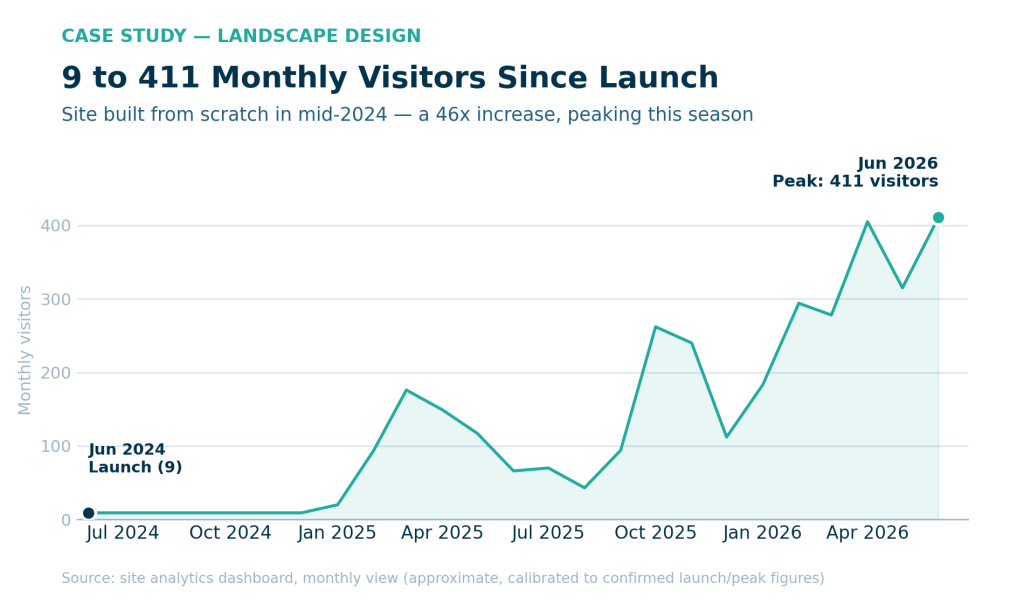
Monthly visitors for the landscape design company above, from launch in mid-2024 through this season.
The Seven-Step Recap
✓ Pick your service area and the jobs you want more of first
✓ Map every page and its job before opening a design tool
✓ Build on a platform you own and can update yourself
✓ Show real photos, reviews, and your phone number on every page
✓ Give each service and town its own SEO-ready page
✓ Treat launch as day one of maintenance, not the finish line
✓ Track calls and quote requests, not just visits
If you'd rather have this built for you than build it yourself, that's what our Growth Partner plan covers, from the first page plan to ongoing SEO. Get in touch and we'll walk through where your website stands today.
